Anonymise documents, offline on your own workstation
Verilak is anonymisation software: it anonymises PDFs, Word documents, scans and photos without them ever leaving your organisation. Personal data is truly redacted, the hidden metadata is removed and a separate check makes sure nothing is left behind. A person decides what gets redacted.
What is anonymisation?
A document is anonymous when nobody can trace it back to a person, not even with other information at hand. Anonymous data falls outside the General Data Protection Regulation (GDPR). That is why you anonymise a document before you publish or share it, for example for a Woo request, a subject access request or a research report.
What does anonymised mean?
Anonymised means that data can no longer be traced back to a person. An anonymised document therefore contains no names, addresses, citizen service numbers, phone numbers or photos that identify someone. Not even when you put the document next to other information, such as an organisation chart or a news article.
Pseudonymised is something else. Replacing a name with "Person 1" still leaves personal data: with the key or the context the person can be found again. Under the GDPR that remains personal data. Verilak therefore does not pseudonymise documents. It redacts: the data is removed from the file.
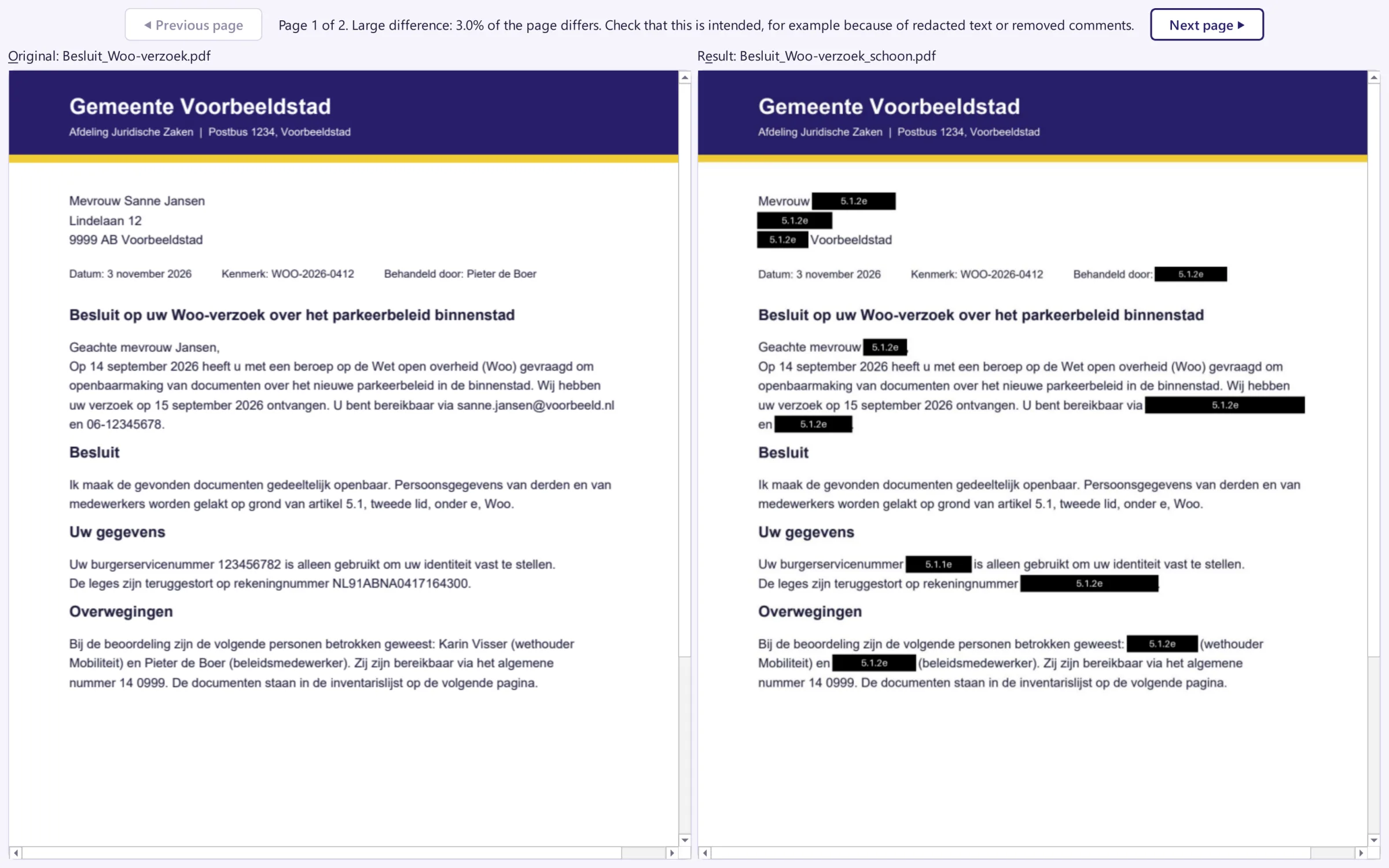
For a document, anonymised means three things: the personal data in text and images is redacted, the text under the redactions is truly removed and the hidden metadata, such as the author and comments, is taken out.
How Verilak anonymises
1. In the text
Verilak proposes which names, addresses, citizen service numbers (BSN), bank account numbers and other personal data should go. A person reviews every proposal. A redacted page becomes an image, so nothing is left under the box.
2. In images and scans
Text recognition (OCR) finds personal data in scanned pages. Faces in photos are detected and proposed. A photo stays a photo, in its own format.
3. In the file
Author, comments, tracked changes, GPS location and other metadata are removed. A redacted document with the author's name in its properties is not anonymous.
4. Checked
A separate check searches the whole result for any redacted text that is still there. Only a file that passes is delivered. Otherwise it stays blocked.
Why anonymise offline?
A lot of anonymisation software runs in the cloud: you upload the document and the vendor processes it. For documents full of personal data that means another party, a data processing agreement and questions about where the data is kept. Verilak works differently:
- Nothing leaves the workstation. No account, no cloud and no connection to the vendor. We never see your documents.
- Isolated. Every file is processed in a separate process without network access.
- The original stays. Verilak always writes a new copy.
- Fits the BIO and the GDPR. Read more on Security and compliance.
Which files?
- PDF, including scanned PDFs.
- Word, Excel, PowerPoint and OpenDocument. These are converted to PDF for redaction.
- Photos and scans as JPEG, PNG, TIFF, WebP or BMP. They keep their own format.
Removing metadata only, without redaction, works for many more file types: see File types.
Whether a document is truly anonymous also depends on the context. A job title, an address or a described event can still make someone recognisable. Verilak makes proposals; a person reviews them and decides.
Frequently asked questions about anonymisation
What is the difference between anonymisation and pseudonymisation?
An anonymised document can no longer be traced back to a person; it then falls outside the GDPR. Pseudonymisation replaces a name with, for example, a code. With the key or the context the person can be found again, so it is still personal data. Verilak redacts: the data is removed from the file.
Do I have to upload my documents?
No. Verilak runs on your own workstation, without account, cloud or connection to the vendor. Your documents never leave the organisation and we never see them.
Does Verilak anonymise automatically?
Verilak makes proposals: names, addresses, citizen service numbers, bank account numbers, faces and more. A person reviews every proposal. Nothing is redacted without review, because whether a document is truly anonymous also depends on the context.
Is the metadata anonymised as well?
Yes. After redaction Verilak removes the author, comments, tracked changes, GPS locations and other hidden data from the file. A separate check then makes sure the redacted text is not still there.
Try anonymisation with your own documents?
In a six week pilot you test Verilak with real documents, on your own workstations. They stay with you.